


This article introduces 3 techniques for building SpringBoot applications into Docker images using Maven.
(1)Use the built-in build-image.
(2) Use Google’s jib-maven-plugin。
(3)Use dockerfle-maven-plugin。
Spring Boot Application
A Spring Boot project is needed for convenient hands-on practice.
Demo project URL:
https://github.com/davelms/me...
Project environment:
Java 11
Maven 3.6.3
Use mvn package can build the jar package successfully.
It can also run properly:
java -jar target/demo-application-0.0.1-SNAPSHOT.jar
Test page:
http://localhost:8080/hello

The demo project is ready. Next, let's put the 3 methods of building images into practice.
I. build-image in the Spring Boot Maven Plugin
Spring Boot comes with its own plugin for building Docker images. We do not need to make any changes because it is already included in spring-boot-starter-parent in pom.xml.
You don't need to write a Dockerfile or worry about anything else: the plugin takes care of it all for you, including the security, memory, and performance considerations recommended by Spring.
Simply run:
mvn spring-boot:build-image
Once execution finishes, you will see a success message:

Run the container test:
docker run -p 9090:8080 -t demo-application:0.0.1-SNAPSHOT
Note: The local port mapped here is 9090。

II. jib-maven-plugin
Jib is a Maven and Gradle plugin for creating Docker images.
This plugin has one very distinctive feature:No local Docker installation required,which is very convenient for continuous integration, as Jib can push directly to the specified Docker registry.
Jib likewise does not require writing a Dockerfile.
It is also very convenient to use: no code changes are required, and you can leave pom.xml unchanged as well.
Simply run:
mvn compile com.google.cloud.tools:jib-maven-plugin:2.3.0:dockerBuild
mvn compile
is the familiar maven compilation command.
com.google.cloud.tools:jib-maven-plugin:2.3.0
Specifies the use of the Jib plugin
dockerBuild
is an execution goal of the Jib plugin,dockerBuild specifies that Jib uses our locally installed Docker.
Once execution finishes, you will see a success message:

Start the container for testing:
docker run -p 9091:8080 -t demo-application:0.0.1-SNAPSHOT
Note: The local port mapped here is 9091。

III、dockerfile-maven-plugin
This plugin requires us to write a Dockerfile, which is already prepared in the Domo project.
The Dockerfile needs to be placed in the project's root directory, alongside pom.xml.
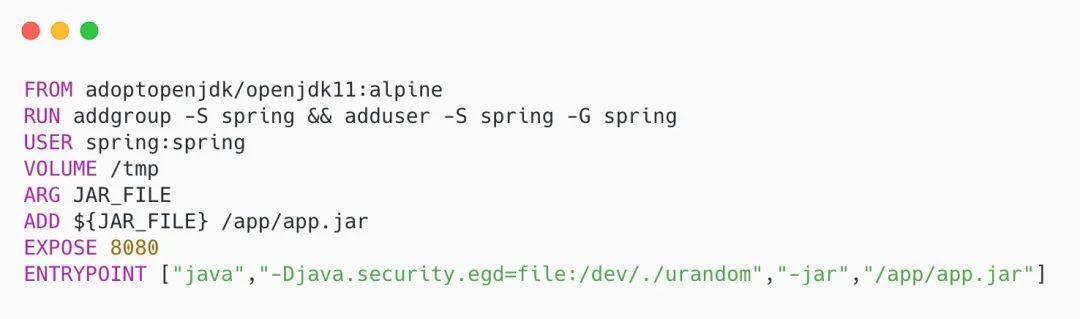
Next, add some configuration to pom.xml to specify the repository, tag, and the previously defined Dockerfile's JAR_FILE。
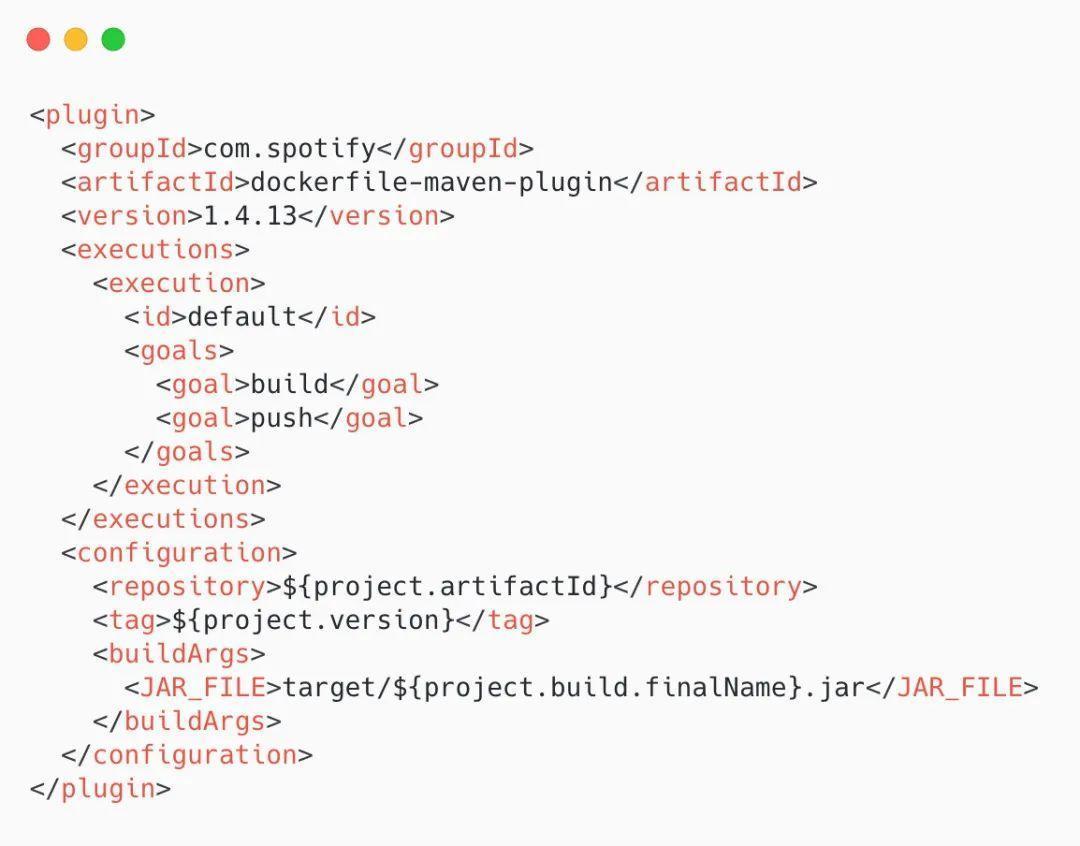
Execute mvn package will automatically build the image, and once execution finishes, you will see the following message:

Run the container:
docker run -p 9092:8080 -t demo-application:0.0.1-SNAPSHOT
Note: the mapped local port is 9092。

Recap
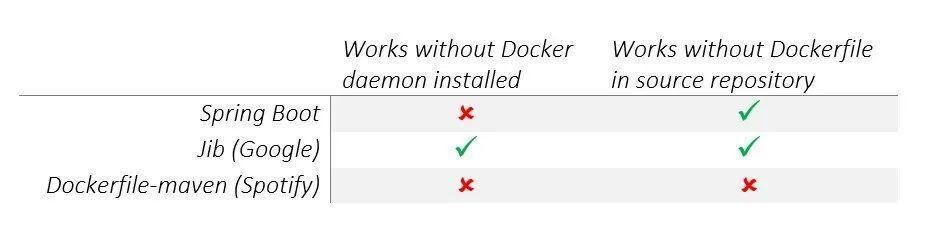
Of these 3 options, SpringBoot's native approach is the most convenient: it works directly without you having to do anything yourself.
Jib stands out the most: it does not require Docker to be installed locally, can push directly to a specified repository, and is very easy to use.
The dockerfile-maven-plugin appears to be the most troublesome plugin: you need to write a Dockerfile and add configuration,However, it is actually the easiest to use, because the first 2 depend on your network environment (you know what I mean). Even if you configure a Docker mirror, errors will still occur; you can try it yourself.