


Problem background:
At around 17:12 on month 9, day 1, we received complaints from implementation staff that some devices could not upgrade properly or receive commands sent from the console. A colleague checked the logs for the control project (hereafter referred to as control) and found that control had not received the shadow information reported by the devices, so it had not sent any commands. The control project interfaces directly with devices and sends them commands and configuration information based on what they report, including upgrades and log reporting. Before IoT went live, control relied on heartbeat reports to obtain current device information; after IoT went live, it relied on device shadow information
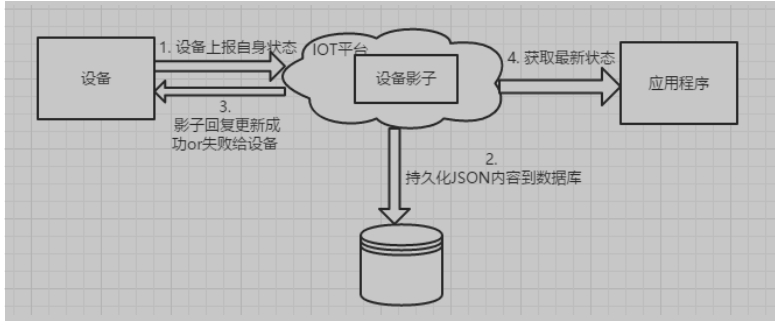
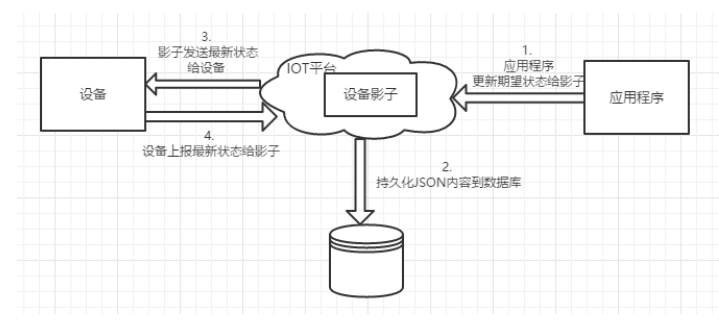
to obtain the device's current information, control subscribes to the device's shadow information. However, that information is forwarded by the shadow service (IoT for short); control does not directly receive device shadow reports. For the specific flow, see the two diagrams below:
The application (control) retrieves the device status
The application (control) sends commands to devices
After learning that control was not receiving shadow messages, I immediately checked the rabbitmq console for messages to establish two things: 1. Whether the device had reported any messages 2. Whether rabbitmq was functioning normally. Figures 1 and 2 below are two screenshots of the rabbitmq console taken at the time. From Figure 1 We can clearly confirm that the device is reporting messages, but many messages are unacked (This indicates that it has already been delivered to the consumer, but the consumer has not sent an ack yet; in theory, waiting a while should allow it to return to normal) For details on which queue has a backlog of unacked messages, see Figure 2,“spacebridgeiot-shadow” is precisely what we use to receive shadow information reported by devices. The messages had all accumulated in the queue, so it made sense that they had not been forwarded to control. After observing for a while, we found that the unacked count had become 0, but the total count had barely changed. It seemed as though the unacked messages had returned to the message queue to await delivery. Sure enough, a few minutes later, we saw a large number of unacked messages again. After another few minutes, these unacked messages returned to the queue, while control still had not received any messages. At this point, we checked the IoT logs and discovered that no shadow messages were coming in at all. In the rabbitmq console, we checked “spacebridgeiot-shadow” Surprisingly, this queue no longer had any consumers, as Figure 3 as shown. Checking the rabbitmq logs at this point did indeed reveal error messages, such as Figure 4 as shown, rabbitmq actively closed the connection.
Figure 1: rabbitmq Overview Diagram
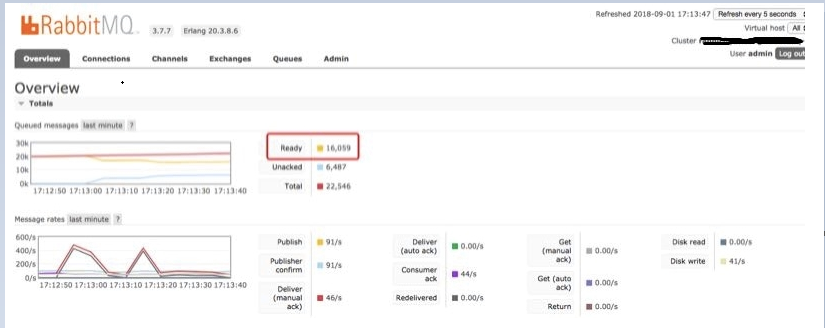
Figure 2: rabbitmq Queue Statistics Chart

Figure 3:spacebridgeiot-shadow overview
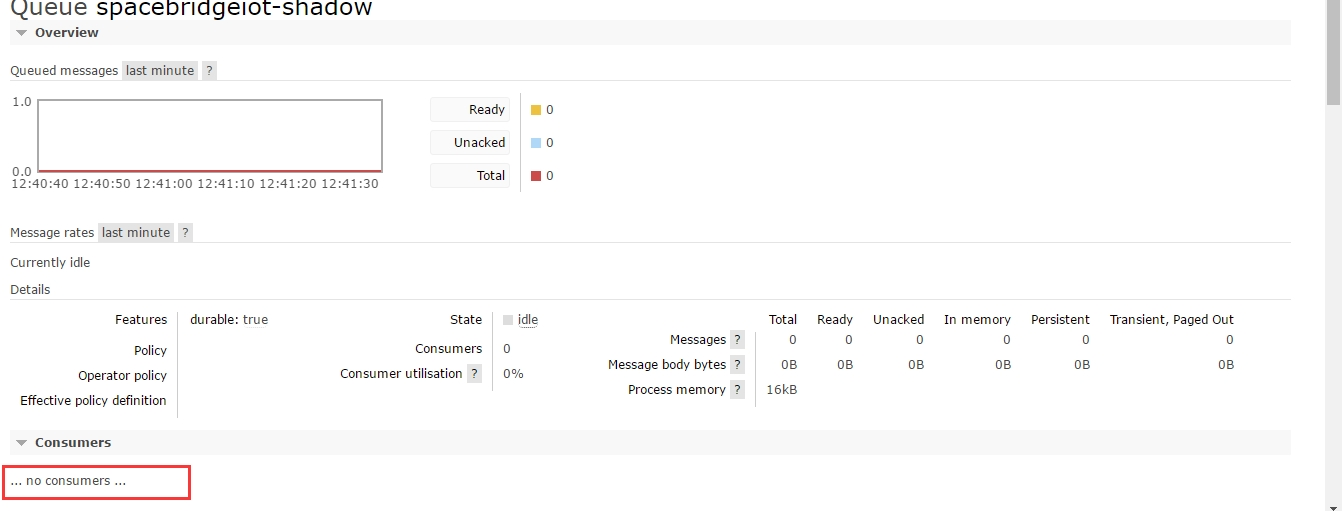
Figure 4: rabbitmq error message

Temporary solution:
Since a large number of complaints had already come in, we took the rather drastic approach of “deleting the accumulated messages”. Sure enough, things returned to normal after deletion(Note: Production issues must be resolved as quickly as possible. There is no time for us to analyze logs and then work through a solution methodically; we have to act fast)。

Reproduce the issue in a non-production environment:
1. Build up a large backlog of messages (at least tens of thousands) in the RabbitMQ queue “mirrorTestQueue” in the 10.200.41.166 environment
2.Stop the consumer for mirrorTestQueue, then restart it once the backlog has built up
3.Once the backlog has accumulated, restart the consumer
As we expected, thousands of messages were pushed to the consumer within a few seconds. After this continued for several minutes, rabbitmq proactively closed its connection to the consumer, at which point the queue's consumer was no longer visible in the console. Since we had enabled automatic recovery for our consumer, it would reconnect automatically after a while,
But the connection would soon be dropped again, much like the issue we encountered in production. What exactly was causing it? To be honest, I had little idea at the time, and after searching online, I still could not find a particularly satisfactory answer (At the time, I had not grasped the essence of the problem, and my search keywords were too broad), later
We suspected something might be wrong at the TCP layer, so we decided to capture packets and see whether we could find any clues. Sure enough, luck was on our side. Without further ado, here is the image.


Before 13:06:25.643428, rabbitmq was still pushing messages to the consumer. At 13:06:25.643428, the consumer's TCP receive window began filling up. This continued for about 30 seconds, after which rabbitmq actively closed the connection (sending an RST packet). The consumer then reconnected, but the window filled up again, and the connection was closed again after about 30 seconds.


It seemed quite regular, lasting 30s each time, which felt like a configurable parameter. Roughly speaking, “tcp full window caused the server to actively rst the connection, and it happened in a regular pattern”
This time, I changed the search keywords and found Answer, RabbitMQ has a parameter called tcp_listen_options.send_timeout is a parameter that controls write timeouts; when a write times out, it triggers a TCP RST(https://github.com/rabbitmq/rabbitmq-java-client/issues/341), modify it and see how it works:
1. Change the write timeout to 10s
tcp_listen_options.send_timeout = 10000
2.Capture packets to see whether it takes effect


About 10s elapsed between the window becoming full and the connection closing.
Review of the Observed Behavior:
Because prefetch was not configured on the RabbitMQ consumer, RabbitMQ delivered too many messages to it at once, filling the consumer's TCP window and triggering RabbitMQ's tcp_listen_options.send_timeout. When this write timeout reaches a threshold, RabbitMQ disconnects the consumer's TCP connection.
The ultimate solution:
Deleting messages earlier was only a last resort. Although it solved the problem, it was too heavy-handed. We need an elegant way to handle this. Since too many messages pushed to consumers filled the TCP window, we should work on the receive rate: when connecting to rabbitmq, just tell it not to send us too many messages.(The following passage is excerpted from https://blog.csdn.net/james_searcher/article/details/70308565)RabbitMQ has a property called prefetch, which refers to the maximum number of unacked messages a single consumer can consume. How should we understand this? MQ sets up a buffer for each consumer, with its size determined by prefetch. Whenever a message arrives, MQ pushes it into the buffer and then to the client. When an ack message is received (the consumer issues a baseack command), MQ frees a slot in the buffer and adds a new message. But if the buffer is full at this point, MQ enters a blocked state. More specifically, suppose prefetch is set to 10 and there are two consumers. This means each consumer prefetches 10 messages from the queue into its local buffer to await consumption. At the same time, the channel's unacked count becomes 20. Rabbit delivers messages in this order: first, it delivers a full 10 messages to consumer1, then 10 messages to consumer2. If a new message needs to be delivered at this point, it first checks whether the channel's unacked count equals 20. If so, the message is not delivered to a consumer and remains in the queue. After one of the consumers acknowledges a message, the unacked count becomes 19. Rabbit then checks which consumer has fewer than 10 unacked messages and delivers the message to that consumer.
In the code, this means
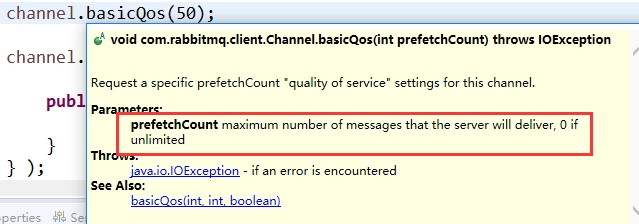
How should this value be assessed? An official RabbitMQ article explains it very well, so I won't go into detail. Our system currently sets it to 20.
https://www.rabbitmq.com/blog/2012/05/11/some-queuing-theory-throughput-latency-and-bandwidth/
Closing remarks:
We are still beginners when it comes to using rabbitmq. Before using it, be sure to read its API documentation thoroughly, familiarize yourself with common APIs, and experiment extensively in a local environment.
